Our production of handmade cards is stunted without a good paper trimmer.
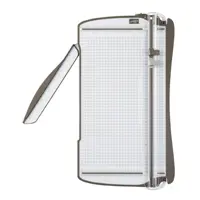
My Stampin' Up! trimmer is a beloved tool in my stamp room. I use it daily. I have 4 of them. I keep 2 in the studio, one in my stamp room and one by my computer.
The beauty of this trimmer is its amazing features. It cuts, scores, has a storage compartment, non-skid feet, a non-marring measuring surface, clear graph lines, a clear cutting guide and extends to accommodate 12" x 12" cardstock. This trimmer has the best of the best features!
I want to also provide you with an additional tip that's not in today's video.
I cut a LOT of cardstock. Hundreds of sheets a month! With all that cutting I notice small pieces of paper fibers in the cutting mat. To insure a clean cut, be sure your cutting mat/track is clear. Cleaning out those paper fibers is simple. Remove the replaceable cutting mat from the trimmer. Using the straight edge of a piece of cardstock, carefully slip the cardstock through the track to dislodge and fibers. Replace the cutting mat back inside your trimmer and you're ready to cut again. The cutting mat is double-sided, too. When one side is worn, flip it over. Replacement cutting mats are available, too. I've included the supply information below.
I also have a video on how to change the blades in this trimmer. You can view that video HERE. Never handle your trimmer with the cutting arm open and do not underestimate that tiny blade. It's sharp! When the blade no longer cuts through your cardstock easily it's time to replace it. I've also included supply information below on the replacement blades.
Take a look at the fabulous features in today's quick tip video.
Online product orders of $25 or more receive exclusive perks. Details on my REWARDS program can be found HERE.